Why the Humble Tasks List Planner Is Reshaping How We Organize Work
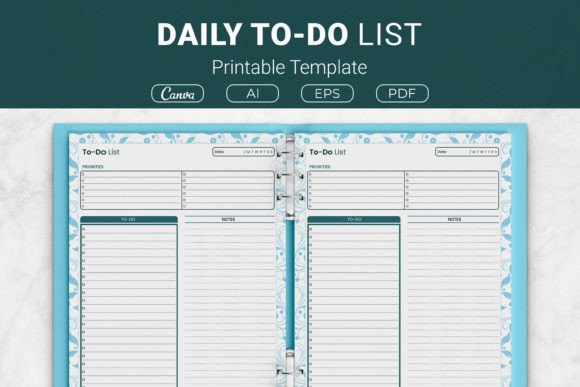
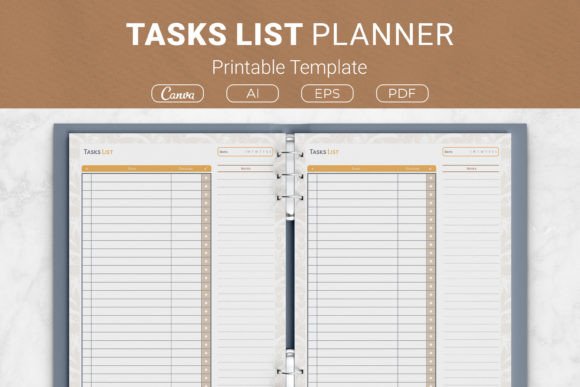
In a world saturated with sophisticated project management apps, AI-driven to-do lists, and notification-heavy collaboration suites, a quiet countercurrent is gaining momentum. Professionals, creators, freelancers, and even seasoned entrepreneurs are rediscovering the clarity that comes from a single sheet of paper. At the center of this shift sits a deceptively simple tool: the Tasks List Planner — a structured weekly tracker that pairs a clean Tasks column with a Deadline column, plus a dedicated notes area for priorities, resources, or fleeting ideas. It sounds almost too basic to matter, yet its relevance is deepening alongside the very trends that promised to make paper obsolete.
The Overlooked Value of Intentional Simplicity
Modern productivity culture often equates capability with complexity. We measure tools by the number of integrations, automations, and views they offer. But for the individual who needs to cut through the noise — the freelancer juggling client deliverables, the indie publisher preparing a book launch, or the small business owner mapping a weekly sprint — cognitive overhead is the real enemy. A Tasks List Planner strips away everything except the essential contract of accountability: what needs to be done, and when.
This isn’t about rejecting technology. It’s about recognizing that the brain processes information differently when it’s anchored to a physical or minimally digital format. Studies in cognitive psychology have long suggested that handwriting tasks reinforces intention and improves recall. Unlike an app that buries overdue items in a collapsed menu, a printed planner keeps commitments directly in view. That constant, gentle visibility turns a task list from a passive repository into an active compass. The planner’s open space for notes invites users to jot down priority levels, required resources, or even the emotional state associated with a task — contextual metadata that rigid software fields rarely accommodate.
The Rise of the Hybrid Workflow and the Planner’s New Role
Remote and hybrid work arrangements have blurred the boundaries between digital and analog life. While many teams rely on shared platforms like Notion or Asana, individual contributors often maintain a parallel personal system to manage their own focus. The Tasks List Planner fits perfectly into this hybrid model. It doesn’t try to replace digital tools; it complements them. A content creator might keep a Notion dashboard for editorial calendars but use a printed weekly planner sheet to isolate the three most critical tasks each day — the ones that cannot slip. A consultant might transfer client deadlines from a CRM into the planner’s deadline column, creating a tactile, single-source truth for the week ahead that requires no screen time to review.
This emerging pattern reflects a broader market realization: consumers are no longer choosing between digital and analog. They’re orchestrating both. The planner becomes the grounding layer — the place where the abstract flow of emails and Slack messages gets distilled into concrete, time-bound actions. The included Ai Illustrator files and Canva template link in the package acknowledge that even analog tools benefit from digital customization. Users can tweak the design, add their branding, or adjust the layout before printing, blurring the line between off-the-shelf and bespoke.
The Printable Planner Economy and Self-Publishing Opportunity
Understanding why a Tasks List Planner matters today requires a look at the explosive growth of the printable planner market, particularly through platforms like Kindle Direct Publishing (KDP). Self-publishing authors and low-content book creators have turned planners, journals, and trackers into a thriving niche. The typical KDP interior must strike a delicate balance: it needs to be professionally designed yet simple enough to work within Amazon’s printing constraints and customer expectations. A planner that includes US Letter, A4, 7.5 x 9.25 inch, and 6×9 inch sizes covers the most popular trim options, making it an ideal KDP interior ready for upload or minor rebranding.
But the demand isn’t limited to KDP sellers. Coaches, course creators, and membership site owners increasingly offer downloadable tools as lead magnets or client resources. A clean, editable Tasks List Planner with open-source–friendly formats like EPS and PDF gives these professionals a foundation they can personalize — inserting a logo, adjusting colors, or adding a coaching reflection prompt. The versatile package essentially serves as a design asset, not just a static product. This reflects a larger shift in how knowledge workers think about tools: they want raw materials that can adapt, not rigid forms that dictate a single way of working.
Why People Are Paying Attention Now
Several converging factors have sharpened the spotlight on straightforward planning systems:
- Cognitive load fatigue. After years of constant connectivity, professionals are seeking “calm technology” — tools that inform without overwhelming. A weekly task planner with empty columns gives the mind a place to rest and prioritize, rather than a barrage of red badges.
- The micro-entrepreneurship wave. The gig economy and creator renaissance mean more people are managing their own workflows without the scaffolding of a corporate project management office. A simple deadline-driven sheet becomes a lightweight operations backbone.
- Ritual and mindfulness. The act of sitting down on a Sunday evening or Monday morning to fill out a physical Tasks List Planner creates a psychological transition into the work week. It’s a ritual that promotes intentionality, something apps with infinite scroll lists rarely offer.
- Privacy and distraction concerns. Writing tasks on paper removes the temptation to check notifications. For freelancers handling sensitive client information, a paper planner also eliminates digital prying.
These are not temporary fads. They represent an evolving understanding of productivity as a holistic practice rather than a pure efficiency metric. The planner’s very lack of complexity is its key advantage in a landscape where feature fatigue is real.
Practical Applications Across Different Audiences
The Tasks List Planner is not a one-size-fits-all gimmick; it’s a flexible template that adapts to vastly different work styles. Consider these real-world scenarios:
Freelancers and Consultants
For a freelance graphic designer balancing multiple client projects, each with its own milestones, the weekly planner sheet serves as a contract with themselves. In the Tasks column they list specific deliverables — “draft logo concepts for Client A,” “revise landing page mockups for Client B.” The Deadline column captures both client-imposed dates and self-imposed checkpoints. The notes area holds the client’s brand guidelines link, file naming conventions, or the priority level based on payment status. Each week gets a fresh sheet, creating a paper trail of completed work that doubles as a lightweight timesheet reference.
KDP and Low-Content Creators
An aspiring self-publisher who wants to launch a line of productivity planners can take the included Ai Illustrator and EPS files and directly customize the interior pages. They might keep the core task-deadline structure but introduce a header with their brand name, swap the font for something more playful, or add a subtle border. Because the sizes cover KDP’s most profitable formats, they can quickly create a whole series — a 6×9 compact edition, an A4 desk version, and a letter-size binder edition. The open-source–friendly nature of the files means no licensing headaches, a critical factor for commercial use.
Small Business Owners and Solopreneurs
Running a small e-commerce store involves juggling inventory restocks, marketing campaigns, customer service follow-ups, and administrative tasks. The owner might print a fresh Tasks List Planner page every Monday and pin it to a wallboard. The deadline column highlights shipping cutoff dates and social media scheduling deadlines. The notes section catches raw thoughts: “Why are open rates dropping? Check subject line A/B test.” Over time, these notes become a valuable log of operational insights that would otherwise vanish in a sea of digital noise.
Remote Workers and Hybrid Teams
Even within a company that mandates Jira or Monday.com, an individual can use the planner for personal focus. Imagine a software developer who pulls their top three tickets from the sprint board into the planner each morning. The deadline column maps to sprint end dates, while notes capture dependency reminders or testing URLs. This personal artifact doesn’t replace the team tool — it shields the developer from context-switching and keeps the day’s objectives crystal clear. At the end of the week, the completed sheet is a satisfying, tangible record of contribution.
Design That Respects Flexibility
One reason the Tasks List Planner gains traction across such diverse users is its structural restraint. The table is undecorated and practical: a column for tasks, a column for deadlines. There’s no pre-printed time slots, no mandatory prioritization grid, no forced categorization. This might seem like a drawback to someone accustomed to GTD contexts or Eisenhower matrices, but experienced planners understand that imposed frameworks can stifle personal systems. The generous notes area becomes whatever the user needs it to be — a list of required resources, a mini journal, a sketch space for workflow diagrams, or even a section for weekly wins.
The availability of multiple file formats — Ai Illustrator (open source compatible), EPS, PDF, and a Canva template link — further respects user agency. Designers and publishers can open the files in professional software to modify every element. Non-designers can drag and drop the Canva template, change colors or text, and generate fresh PDFs without ever leaving a browser. The print-ready PDFs let anyone download and print immediately, no tinkering required. This layered accessibility aligns with the modern expectation that products should serve both plug-and-play users and customization enthusiasts equally.
The Shift Toward Portable, Binder-Ready Systems
Another trend amplifying the appeal of this planner is the resurgence of binder-based organization. While bound planners have their devoted followings, many professionals now prefer loose-leaf systems that let them mix and match page types. A Tasks List Planner designed in US Letter and A4 sizes works perfectly with standard three-ring or disc-bound planners. Users can intersperse weekly task sheets with meeting notes, project outlines, or financial tracking pages. The 7.5 x 9.25 inch and 6×9 inch variants cater to smaller, more portable notebooks that slip into a bag or tablet sleeve. This modularity is essential for people whose workflows change seasonally — a tax preparer might need a different layout in April than in July, and they can simply swap pages rather than abandon an entire planner.
Even for those who prefer a purely digital life, the PDF format integrates into tablet note-taking apps like GoodNotes or Notability. A user can import the weekly sheet, write with a stylus, and keep an infinite digital planning archive. The same file that prints beautifully at home becomes an interactive digital page. This fluidity between analog and digital is exactly what modern professionals require.
Why the Minimalist Toolkit Is a Competitive Advantage
In a broader business context, the organizations and individuals that thrive are often those that can strip away non-essential complexity. The Tasks List Planner embodies this philosophy. It doesn’t promise to change your life; it simply holds space for your commitments and adds a deadline column, which research consistently shows is the single most powerful motivator for task completion. When a tool reduces friction instead of adding steps, adoption increases. People actually use it beyond the first week.
There’s also a subtle economic undercurrent here. Businesses and freelancers that rely on elaborate software subscriptions can experience cost creep. A reusable digital file that can be printed indefinitely offers a one-time investment with zero recurring fees. For a freelancer just starting out, that’s meaningful. For a KDP publisher, the math is even more compelling: a single well-designed interior can generate ongoing royalties without the need for continuous design expenditure. The Tasks List Planner package, with its commercial-ready licensing, provides that foundation.
Looking Ahead Without Predicting
As artificial intelligence begins to manage more of our scheduling and even suggest task priorities, the role of a simple weekly task sheet won’t diminish; it will evolve into a deliberate decision space. The human act of reviewing machine recommendations and then writing down chosen priorities reinforces autonomy. The Tasks List Planner might become the layer where AI output meets human judgment — a place to consolidate, filter, and commit. Already, early adopters use AI to generate a raw dump of weekly tasks, then manually curate those into a printed sheet to create a psychologically manageable list.
The market for such tools will likely continue to grow as more individuals seek to design their own productivity environments rather than adopt standardized ones. The planner’s open-source–friendly file structure and template link support this movement, enabling unbranded, user-tailored outputs. This isn’t a rejection of digital progress; it’s an integration that honors human cognition.
What makes the Tasks List Planner quietly powerful is that it doesn’t try to be everything. It is a table with two critical columns and a notes section, available in the sizes people actually use, from letter-size binders to compact notebooks. It arrives as editable vectors for those who want to experiment, and it ships as a ready-to-print PDF for those who just need to get started. In a culture that often confuses more with better, this restraint is not a limitation — it’s the entire point.