Master Your Content Strategy: The Ultimate Guide to Using a Post and Content Planner
In a digital landscape flooded with information, consistency is king. Yet, for many creators, bloggers, and social media managers, staying organized feels like an uphill battle. You start the week with a burst of inspiration, only to find yourself scrambling for ideas by Thursday. That is exactly why a dedicated Post and Content Planner has become an essential tool in modern content creation. Far more than a simple checklist, this structured system transforms chaos into clarity, helping you plan, execute, and refine your publishing strategy with confidence.
What Exactly Is a Post and Content Planner?
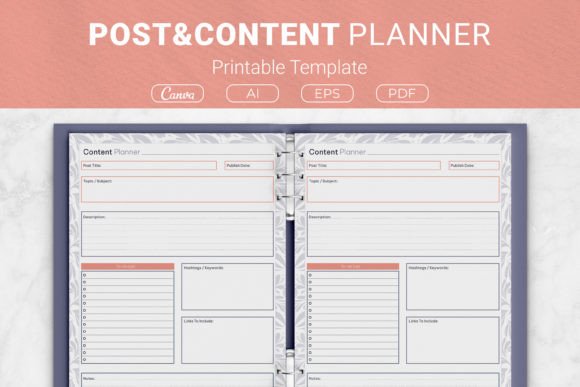
At its core, a content planner is a strategic blueprint. Think of it as a command center where every piece of content you intend to publish gets mapped out before it ever goes live. Unlike a basic notebook or a random digital note, a well-designed planner includes dedicated fields for the critical elements that make content successful. You will typically find sections for the post title, the publish date, the overarching topic subject, a detailed description of the content itself, a practical to-do list, relevant hashtags and keywords, links to include, and a space for general notes.
These printable templates are designed to bridge the gap between abstract ideas and published posts. By forcing you to articulate not just what you are posting, but why and how, they elevate your content from reactive to strategic. Whether you are a seasoned social media manager handling multiple brand accounts or a blogger nurturing a personal passion project, the planner provides a repeatable framework for success.
Why Wingin’ It No Longer Works
The days of throwing up a post whenever inspiration strikes are fading fast. Audiences crave predictability and value. Algorithms reward consistency. When you rely on spontaneous creation alone, you risk burnout, brand inconsistency, and missed opportunities tied to seasonal trends or product launches. A content planner helps you see the big picture—an entire month or quarter laid out visually—so you can balance promotional posts with educational content, storytelling, and engagement-driven pieces. This intentional mixing, often called the content mix or content pillars approach, is nearly impossible to sustain without a dedicated planning tool.
Anatomy of the Perfect Planner Page
Not all planners are created equal. A truly effective Post and Content Planner goes beyond listing dates. Let's break down the key sections that make a template genuinely functional:
- Post Title and Publish Date: These two fields anchor your content in time. Committing to a title early forces you to clarify the angle of your post. Pairing it with a specific date creates accountability.
- Topic Subject: This is your content pillar identifier. Is this post about a product feature, a customer story, an industry insight, or a behind-the-scenes moment? Categorizing ensures you maintain a healthy balance and don't accidentally go silent on one part of your message.
- Description: Here, you draft the core message. For a blog post, this might be the meta description or a summary. For a social media caption, it is the hook. Writing it out in advance allows you to refine your voice and ensure it aligns with the visual assets you plan to use.
- To-Do List: Content creation involves many moving parts. This section might include tasks like “design infographic,” “approve copy,” “record voiceover,” or “source stock photos.” Breaking down the post into granular tasks prevents last-minute panic.
- Hashtags and Keywords: Discoverability matters. By planning your hashtag sets and target keywords ahead of time, you can research trending terms and avoid the dreaded rush of typing generic tags seconds before hitting publish.
- Links to Include: Whether it is an affiliate link, a link to a previous blog post, or a product page, having these URLs ready saves time and ensures you never forget to include that crucial call-to-action.
- Notes: This is your wildcard space. Use it for collaboration comments, A/B testing ideas, or noting the emotion you want the visual tone to convey.
Who Benefits Most from This Organizational System?
While the utility of a content planner is nearly universal, certain groups find it absolutely transformative:
- Social Media Managers: Juggling multiple platforms and clients requires ironclad organization. A planner keeps posting schedules, client approvals, and performance notes in one accessible place.
- Bloggers and Influencers: The pressure to constantly produce fresh content can lead to creative fatigue. A planner helps batch-process ideas and repurpose content across channels efficiently.
- Small Business Owners: When you are wearing every hat, marketing often gets pushed aside. A pre-planned content schedule ensures your brand stays visible even during the busiest weeks.
- Kindle Direct Publishing (KDP) Authors: This is a unique and powerful use case. Many creators buy planner templates specifically designed as KDP planner interiors. If you are an author or a low-content publisher, you can use these files to create and sell your own physical content planner books on Amazon.
From Digital Layout to Physical Powerhouse
One of the most appealing aspects of the Post and Content Planner package is its format flexibility. You receive the source files, allowing you to use the planner however suits your workflow best. Some people prefer a purely digital workflow, filling in fields on a tablet using a stylus. Others are tactile learners who retain information better when they physically write it down, printing the planner at home and storing the pages in a binder. The package bridges this gap beautifully.
The inclusion of Ai Illustrator open source files means you have full creative control. You can tweak colors, add your logo, or adjust the layout without starting from scratch. The EPS file provides a universal vector format compatible with nearly all design software, while the PDF files are ready to print instantly, no customization required. For those who love an intuitive drag-and-drop editing experience, the included link Canva templates are a game-changer. You can customize the planner in your browser, at no extra software cost, and export it in crisp resolution.
Choosing the Right Size for Your Needs
The physical dimensions of your planner matter more than you might think. This particular package acknowledges that users have diverse needs by offering multiple size variations:
- US Letter (8.5 x 11 in): Ideal for standard home printing and three-ring binders. Offers plenty of writing space, perfect for detailed to-do lists and lengthy descriptions.
- A4 (210 x 297 mm): The international standard, commonly used in offices around the world outside the US. It provides a similar generous layout to the US Letter size.
- 7.5 x 9.25 in: A practical mid-size option that balances portability with writing comfort. It is easy to slip into a laptop bag or a larger purse.
- 6×9 in: This compact size is particularly popular for KDP planner interiors. It feels like a professional trade paperback and is economical to print and ship via print-on-demand services. It is also charming as a personal desktop companion.
Having this range of sizes ensures you can create a consistent planning system whether you are at your desk, in a coffee shop, or packaging a commercial product for sale.
Practical Strategies to Maximize Your Planner
Owning the template is the first step; using it effectively is where the magic happens. Here is how to integrate the planner into a workflow that produces results:
- Host a Monthly Planning Party: Set aside two to three hours at the end of each month to fill out your planner for the weeks ahead. Bring coffee, eliminate distractions, and generate a bulk of ideas in one sitting.
- Work in Batches: Use the to-do list section religiously. On “writing day,” look at your planner and write all the captions for the week. On “design day,” create all the graphics. This batch-processing method is far more efficient than jumping between tasks for each individual post.
- Track Evergreen Content: Use the notes section to mark posts that performed well and are “evergreen”—meaning they don't expire. Schedule them to be reshared two or three months later. The planner helps you identify these gems and keep them in circulation.
- Align with Your Sales Funnel: Before you fill in a single title, ask yourself what the goal of the content is. Is it to raise awareness, build trust, or make a sale? Structure your topic subjects so they naturally guide a follower through a journey, and use the “links to include” field to connect the dots.
Common Misunderstandings About Planning
A common objection is that planning stifles creativity. In reality, a Post and Content Planner does the opposite. It removes the cognitive load of deciding what to do next, freeing up mental bandwidth for true creative execution. Another misconception is that a planner is only for “big” creators. Even if your audience is small, treating your content with professional-level organization builds trust. Consistency in publishing signals reliability, which often converts casual followers into loyal community members.
Versatility Beyond Social Media
The label “content planner” undersells the versatility of this tool. If you are a student managing a blog alongside a research project, you can adapt the planner to track your citations and notes. If you are a podcaster, the “links to include” section becomes your show notes repository. If you are a teacher, you can use the template to plan lesson announcements and resource shares. The structure is a canvas; you bring the context.
Furthermore, the commercial rights granted with the open-source files open doors for graphic designers. You can customize the interior heavily and offer it as a premium product in a niche market. A food blogger might package a recipe content planner; a fitness coach could brand one specifically for workout tip scheduling. The foundation is built, allowing you to exercise your creativity on a stable, professional architecture.
What to Look for in a High-Quality Template
With many options available online, quality differentiates a frustrating experience from a fluid one. A superior content planner template should be print-ready at 300 DPI resolution, ensuring text and lines are sharp with no pixelation. The files should be editable, as this package is, with native support in Adobe Illustrator and compatibility with free tools like Canva. The inclusion of multiple file types—Ai, EPS, PDF, and a Canva link—eliminates technical friction. Regardless of your software proficiency, there is a file format ready for you.
Additionally, a quality planner doesn't dictate a single workflow; it adapts to yours. The package described here understands that some users need the white-label flexibility of an AI file, while others just want to print a cute, functional sheet and clip it into their personal binder. This dual-purpose design—ideal for personal use at home and commercial use as a KDP interior—represents exceptional value.
Building a Long-Term Content Habit
The ultimate goal of embracing a Post and Content Planner is habit formation. The first few weeks might feel mechanical as you adapt to documenting ideas rather than just thinking them. But eventually, the planner becomes a trusted external brain. You will stop worrying about forgetting ideas because they are captured safely. You will start identifying patterns in your high-performing posts. You will, perhaps for the first time, feel truly in control of your content narrative.
If you have ever felt overwhelmed by the relentless demand for new posts, a structured planner is your blueprint back to sanity. It doesn't just organize your editorial calendar; it organizes your thoughts, goals, and creative process. It takes the scattered fragments of your imagination and shapes them into a consistent, impactful voice that serves your audience and meets your goals.
Taking the First Step
Moving from disorganized posting to strategic planning is simpler than it seems. Procure a template suite that offers the flexibility you need—whether that is the programmable vectors of an Ai Illustrator file or the immediate comfort of a ready-to-print PDF. Choose your size. If you intend to publish on Kindle Direct Publishing, the 6×9 size is a proven winner; if you are organizing your personal life, the US Letter or A4 provides ample writing space.
Print a test page. Fill it out for one piece of content you already have in mind. Notice how the structured fields guide you to think about keywords and links you might otherwise overlook. That single experience often converts skeptics into devoted users. A planner doesn't constrain your creativity; it gives it a home, a timeline, and a clear path to reach the people who need to see it most.