Evaluating Cleaning Sign-Off Sheet KDP Interiors for Your Low-Content Book Business
If you publish journals, logbooks, or organizational tools on Amazon KDP, you know that a clean, functional interior can make or break customer satisfaction. A Cleaning Sign-Off Sheet KDP Interior is precisely that — a pre-designed set of printable pages built to track cleaning tasks, responsibilities, and sign-offs, formatted specifically for Kindle Direct Publishing. Instead of designing from scratch, you get a ready-made, tested template that helps you launch a cleaning logbook, a housekeeping journal, or a commercial maintenance tracker in a fraction of the time.
This article explores what these interiors offer, the practical tradeoffs involved, and how to decide whether a template like this matches your publishing goals. The focus is not on selling a product but on giving you a balanced, decision-oriented look so you can invest your time and money wisely.
What a Cleaning Sign-Off Sheet KDP Interior Actually Includes
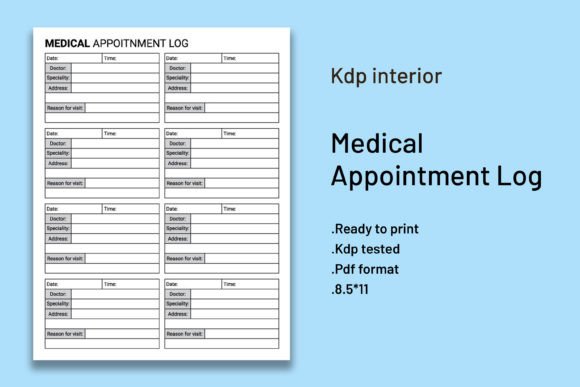
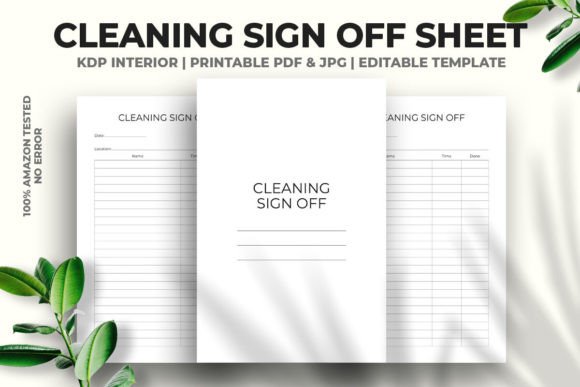
At its core, the interior is a multi-page PDF featuring structured tables, columns, and spaces designed for logging cleaning activities. A typical Cleaning Sign Off Sheet KDP Interior includes sections for date, area or task description, cleaner’s name, supervisor sign-off, time completed, and notes. The layout repeats across many pages — often 120 pages in the example we’re examining — so you get a fully cohesive book without hunting down filler content.
Key technical features often touted with these products include:
- Size and bleed settings: Commonly 6×9 inches with no bleed, which is a standard trim size and layout for KDP. This reduces upload errors and ensures the content isn’t clipped during printing.
- Vector-based editing: Because the PDF is fully vector and can be opened in Adobe Illustrator, you can adjust colors, fonts, or logo placement without quality loss. This flexibility matters if you’re branding the interior for a specific hotel chain, cleaning company, or clinic.
- High-resolution assets: A 300 DPI JPG is often included for previews or promotional material, though the main print file remains the vector PDF.
- Pre-tested on KDP: Knowing the file has been uploaded and approved without errors saves you the trial-and-error of fixing margins, gutter issues, or transparency problems.
This isn’t just a random collection of table lines; it’s a purpose-built document where the page count, paper color (if any), and spacing have already been calibrated for a no-content or low-content book. For someone new to publishing, that calibration is a significant asset.
Why Publishers Consider This Type of Template
The low-content book market on Amazon is competitive. Time-to-market matters. A Cleaning Sign-Off Sheet KDP Interior lets you skip the entire layout phase — including column width adjustments, margin testing, and PDF/X compliance checks — and move directly to listing optimization, cover design, and keyword research. This matters if you’re managing a portfolio of dozens of similar logbooks, where each new title shouldn’t become a design project.
There are also specific audience needs driving demand. Commercial cleaning crews, Airbnb hosts, facility managers, and household chore planners all look for structured, no-nonsense tracking. A well-organized interior satisfies a real-world documentation requirement. It’s not just decorative; it serves a compliance function in many settings. Because the template is vector editable, you can tailor headings to different niches — for example, “Restroom Sanitation Log” or “Weekly Cottage Cleaning Schedule” — from a single base file.
Then there is the consistency advantage. If you release a series under a unified brand, having the same interior structure across “Office Cleaning Log,” “Medical Facility Cleaning Log,” and “Vehicle Interior Cleaning Log” builds recognition and trust. You can duplicate the core sign-off sheet layout and adapt only section titles.
Real Benefits When You Use a Pre-Tested File
The most underappreciated benefit is error prevention on KDP’s print side. Amazon’s automated checker often flags interiors that have stray elements in the bleed area, mismatched size, or fonts that aren’t embedded. A file specifically marked as “100 Tested on Amazon KDP No Error” suggests the creator has already navigated those technical hurdles, reducing the chance you’ll receive a content rejection email right before a product launch. That peace of mind is tangible when you’re scheduling promotions or counting on a new title.
Other practical upsides include:
- Fast customization: Since the PDF is vector and resizable, you can adjust the entire document size from 6×9 to 8.5×11 in Illustrator without starting over. This is helpful if you later decide to publish a larger format version for worksite clipboards.
- Print-ready convenience: A ready-to-upload PDF eliminates the step of exporting with correct settings, embedding fonts, or converting colors to CMYK if you outsource printing. The file arrives primed for both KDP print and potential print-on-demand extensions.
- Complementary assets: The inclusion of a high-resolution JPG lets you create listing images, A+ content mockups, or social media posts showing the interior, which can speed up your marketing.
These benefits cluster around efficiency, not artistic distinction. The value is operational — a “just add a cover” asset that frees you to do higher-level business tasks.
Tradeoffs and Points That Deserve Caution
No template fits every need perfectly. One drawback is differentiation. If multiple sellers use the same Cleaning Sign Off Sheet KDP Interior without meaningful customization, the books can look nearly identical to customers. This increases the risk of negative reviews that say “looks like every other cleaning log on Amazon.” To stand out, you must modify the interior beyond what the base file offers — changing the typeface, column labels, or adding a unique introduction page.
Another consideration is page count limitation. A fixed 120-page interior works for many use cases, but some buyers want daily logs for an entire year (365 entries) or weekly logs across multiple locations. You can’t easily add pages to a pre-structured PDF without compromising the repeating pattern, and extending the document could require rebuilding from the source vector file — which you may not have if only a PDF is supplied. Although vector editable, some sellers provide only the PDF, not the original AI or EPS file, so check that before purchase.
Also weigh the learning curve for vector editing. If you don’t own or know how to use Adobe Illustrator, the fact that the PDF is “fully vector editable” becomes less useful. You can still upload the PDF as-is and simply change the cover, but any interior text changes would need a vector editor or a workaround like converting to an image. That’s acceptable if the default headings like “Date,” “Task,” “Initials” suit your audience exactly; otherwise, you might feel locked in.
When a Cleaning Sign-Off Sheet KDP Interior Makes Strong Sense
This type of template aligns especially well with certain publishing scenarios. You are likely to get the best return when:
- You’re building a niche series quickly. Launching several cleaning log variations for restaurant kitchens, school janitorial staff, hospital environmental services, and vacation rental turnovers becomes manageable when each interior starts from the same tested foundation, customized slightly for each niche.
- Your design skills are limited. If you struggle with creating even tables or aligning text boxes, a ready-made interior takes the layout burden away. You focus on market research and cover design instead.
- You need to test a product idea fast. Rather than spend hours designing a prototype, you can publish with this interior, get real sales data and customer feedback, then invest in a custom redesign only if the niche proves profitable.
- Print quality matters more than uniqueness. For technical logs where readability and professional structure matter more than artistic flair, the clean, no-bleed layout with uniform margins creates a credible, usable product.
It’s also a sensible fit if you are a freelancer creating books for clients. You can legally (depending on the license) use the edited interior across multiple client projects, shortening turnaround times and guaranteeing KDP compatibility each time.
When Alternatives Might Be a Better Path
There are situations where a pre-made interior may hold you back. Consider building your own or purchasing a more flexible design asset if:
- You plan to sell hundreds of copies under your own strong brand. Then, a fully custom interior with unique iconography, your own color coding, and a proprietary layout can become a selling point. Relying on a common template risks blending in.
- Your audience expects a very specific format. Certain industries require ISO-compliant sign-off sheets with pre-numbered rows, regulatory disclaimers, or controlled document footers. A generic cleaning log won’t satisfy those requirements, and modifying the vector file to add compliance text might be more work than starting anew in a word processor.
- You need interactive or digital elements. KDP print interiors don’t support fillable forms. If your buyers want a digital PDF with interactive fields, you’d need different tools. The “ready to print” vector PDF is for physical books only.
- Page count flexibility is essential. As noted, a fixed 120-page count may be too short for year-long logs or too long for short-term project trackers. Building your own interior with a repeatable section that you can scale up or down gives you more control.
Another alternative is to use Canva or similar design platforms to create a cleaning log from scratch. The learning curve is gentler, and you retain full ownership of every design element, though you’ll need to handle bleed and margin settings manually. For some publishers, that trade-off is worth it for complete uniqueness.
Practical Decision-Making Insights for Your KDP Workflow
Before you click “buy” on a Cleaning Sign-Off Sheet KDP Interior, ask yourself a few practical questions. First, what is my editing setup? If you have and can use Illustrator, the vector editable feature unlocks real value — you can resize for different trim sizes, alter headers, or add a company logo. If not, you’ll be limited to using the file as-is, which may still be fine if the default text aligns with your vision.
Second, consider the target audience’s handwriting space. A 6×9 inch page provides limited room for entries. Will your customers find the row height and column width comfortable? Opening the PDF on screen and mentally simulating someone writing in the fields can help you judge. If the spacing seems cramped, you might want a larger format, which means testing whether the vector file scales cleanly to 8×10 inches or A4.
Third, evaluate the file’s versatility beyond KDP. The same interior could be marketed as a printable on Etsy, a coil-bound book through a different POD service, or a downloadable planner. Because the PDF is high resolution and includes a JPG, you have assets for multiple channels. Knowing this might influence whether you invest a little more in customization now so that the design works across platforms.
Also, reflect on how the interior handles page numbering or section headers. Some templates include blank filler pages at the end, while others have repeating headers on every page. The latter is usually better for a sign-off sheet, where each page functions independently. If the file has no page numbers, that’s often a plus for a sign-off log, as customers may tear out pages. These small usability factors affect reviews more than you might expect.
How to Maximize Success with a Template-Based Interior
If you decide to go ahead, there are ways to increase the likelihood of positive customer feedback and differentiated listings. Customize the first page to include a “How to Use This Log” section or a sample entry. Since the PDF opens in Illustrator, you can add this explanatory page without breaking the vector structure. A few lines of guidance reduce confusion and make the product feel more complete.
Additionally, pair the interior with a thoughtful cover that clearly states the niche — for example, “Short-Term Rental Cleaning Logbook” or “Daycare Sanitization Tracker.” When the cover targets a specific user and the interior maintains a generic but clean layout, you hit a sweet spot of relevance and efficiency. You can also create multiple variations from the same interior by editing the top header on each page to reflect different environments, effectively versioning the file for separate listings.
Finally, test print a physical copy before marking the book as live on KDP. Even a “100 Tested” file can show subtle issues with your local print setup or Amazon’s print facility in your region. Ordering an author copy lets you verify that the formatting, margins, and font clarity meet your standards. That small step can prevent returns and protect your seller reputation.
In the low-content publishing game, speed and reliability often beat absolute originality for many sellers. A Cleaning Sign Off Sheet KDP Interior that is fully editable, tested, and print-ready fits squarely into that equation. It won’t automatically make your book a bestseller, but it removes significant technical friction so you can focus on what actually moves the needle: knowing your audience and presenting a product that solves a real record-keeping need. Weigh the tradeoffs honestly against your own skills and market vision, and you’ll know whether this ready-made interior can serve your publishing plan.