2024 Gratitude Journal: Smart Practices and Hidden Mistakes That Undermine Your Reflection Habit
A gratitude journal isn’t just a collection of pretty pages. When you pick up a digital product like the 2024 Gratitude Journal with its 122 ready-to-use Canva templates, you’re holding a tool that can shape your daily mindset—if you use it thoughtfully. Many people dive in, download the files, and still end up frustrated. The problem usually isn’t the journal itself; it’s a series of small, easily avoidable decisions that chip away at consistency, print quality, and genuine reflection.
This article walks you through the most common missteps buyers and first-time users make with printable gratitude planners. You’ll learn what to check before hitting “print,” how to keep your editable link working long term, and why some well-intentioned customization choices backfire. The goal isn’t to overwhelm you with rules—it’s to help you get the calm, reliable practice you originally imagined when you chose this template set.
Why the 2024 Gratitude Journal Template Set Is More Than a Simple PDF
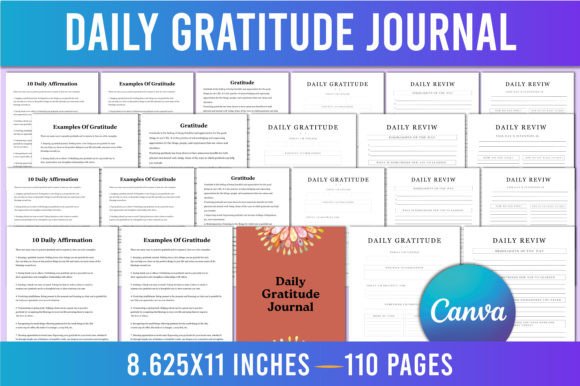
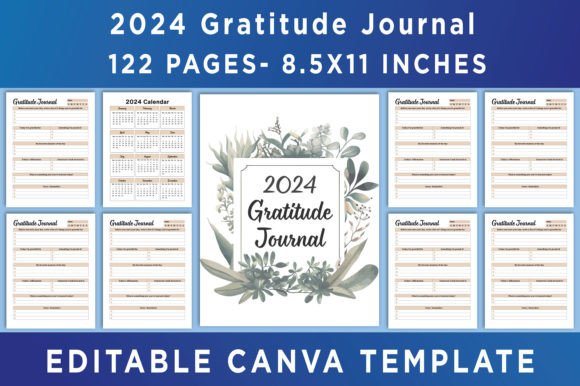
Before unpacking mistakes, it’s worth understanding what you’re actually receiving. This product bundles high‑quality PDF, JPEG, and PNG files, along with an editable Canva link. You get a 2024 calendar, a dedicated “Belongs To” page, and 122 unique templates designed for gratitude reflection, all formatted at 8.5×11 inches, CMYK color, 300 DPI, with no bleed. That technical spec isn’t marketing filler—it’s the foundation for clean, professional-looking prints whether you use a home printer or a local copy shop.
The real power, though, lives in the Canva integration. Instead of being locked into fixed prompts, you can drag, drop, and tweak every element using a free Canva account. But that flexibility introduces its own set of pitfalls. Let’s walk through them one by one.
Mistake 1: Working Directly on the Original Shared Template
This is by far the most frequent and costly oversight. When you open the editable Canva link, you’re viewing a master copy that the creator maintains. If you start editing that file without making a personal copy, two things happen: your changes can be lost if the owner updates the original, and you might accidentally leave the shared link active for others, which can be a privacy or access headache.
What to do instead: As soon as you click the link, go to your Canva home, look for the option to “Make a copy,” and store the duplicate in your own account. Work exclusively on that copy. The original link stays untouched, and you preserve your customizations safely. This simple step also ensures you can revisit and edit months later without any surprises.
Mistake 2: Ignoring Print Specifications and Wasting Ink on the Wrong Settings
You might download the beautiful templates and send them straight to your printer, only to get muddy colors, cutoff edges, or washed-out gradients. That happens because many users overlook the CMYK color mode and the fact that the files are designed with no bleed. Home printers often default to RGB or let scaling crop into the margin. The result? A journal that looks nothing like the screen preview.
Before printing, double‑check your printer dialog: select “Actual size” or “100% scale,” ensure the paper size is set to 8.5×11 inches, and if your printer supports it, choose a high‑quality or photo paper mode to match the 300 DPI resolution. For professional printing services, explicitly tell them no bleed is required; otherwise they might enlarge the artwork, losing parts of your layout. A quick test print of a single page saves time and paper.
Mistake 3: Over-Customizing to the Point of Visual Clutter
Canva’s drag‑and‑drop interface makes it tempting to add multiple elements—new fonts, extra icons, textured backgrounds, motivational quotes—until the page feels busy instead of calming. A gratitude journal works best when there’s breathing room to actually write or type your thoughts. When decoration overpowers the prompt, you’re less likely to return to it daily.
A better approach: pick a consistent font pairing and a subtle accent color. Use the existing template structure as a guide. If you want more personalization, consider adding one photo or a monogram to the “Belongs To” page, then leave the inner reflection pages largely untouched. Simplicity supports focus.
Mistake 4: Choosing the Wrong File Format for Your End Goal
The download bundle gives you PDF, JPEG, and PNG options. Each serves a different purpose, and mixing them up can degrade your finished product. For instance, saving a JPEG version and printing it often introduces compression artifacts and slight blurriness, especially on text-heavy pages. PNG, while crisp, can create unnecessarily large files and might not handle black text on white backgrounds seamlessly in all print workflows.
Practical rule of thumb: Use the high‑quality PDF files for any physical printing. If you want to share a single template on social media or insert it into a digital planner app, a JPEG or PNG works well—just make sure you export at 300 DPI from Canva if you’re customizing first. The included files are already optimized, so lean on them rather than re-exporting unless you’ve made significant changes.
Mistake 5: Skipping the “Belongs To” Page and Calendar Integration
It’s easy to scroll past the first few templates and jump straight to the daily prompts. But the “Belongs To” page and the full 2024 calendar aren’t decorative afterthoughts. They ground your journal in accountability and time awareness. Filling in your name and contact info on day one creates a psychological sense of ownership. Referencing the calendar helps you spot patterns—maybe gratitude flows more easily on weekends or dips mid‑month—which informs your practice.
Take an extra five minutes to insert your details. If you’re creating a physical binder, print that page on slightly thicker cardstock for a professional feel. The calendar doubles as a quick mood or habit tracker, so mark significant dates as they happen.
Mistake 6: Downloading Everything But Never Creating a Simple Routine
A beautifully printed 2024 Gratitude Journal sitting on your desk still leaves you empty-handed if there’s no habit alongside it. Many people collect planners, fill the first week enthusiastically, and then abandon the template because they haven’t tied it to an existing ritual.
Instead of aiming for a long, elaborate entry each night, start with two minutes. Pair journaling with your morning coffee or evening wind‑down. Use the same pen, the same spot. The 122 templates give you variety, so you won’t get bored—rotate through section formats like “Today I appreciate,” “A challenge that taught me,” and “One kind act I witnessed.” Consistency beats intensity.
Mistake 7: Treating the Editable Link as a One‑Time Accessory
Some buyers open the Canva link, download a few PDFs, and then forget about the editable access. Months later, when they want to tweak a prompt or add a new month, the link might be hard to locate. Worse, if the creator archives the original design, a copy you never saved disappears.
Create a folder in your Canva account named “2024 Gratitude Journal—My Copy.” Store not only the duplicated template but also any exported PDFs you’ve customized. This small habit protects your work and lets you reuse elements for future years. And if you ever lose the original link, you’ll have your backed‑up version right there.
Mistake 8: Assuming Gratitude Journaling Fixes Big Problems Without Extra Support
A journal is a mirror, not a cure. When someone relies solely on writing “I’m grateful for my health” during a difficult period, they can feel frustrated if their mood doesn’t immediately lift. That disappointment often gets blamed on the template, not the unrealistic expectation.
Use the journal as a companion practice. Pair it with other self‑care actions—a short walk, a phone call with a friend, professional therapy if needed. The prompts work best when they’re part of a broader tapestry. If a particular week feels heavy, allow yourself to write honestly, even if that means acknowledging what you’re not grateful for. The structured format is there to support, not pressure.
Mistake 9: Overlooking the Printing Advantage of “No Bleed” Layouts
Designers often add bleed for edge‑to‑edge printing, but this template set intentionally avoids it. That means your content sits comfortably within the printable area, and you won’t lose journaling lines or text near the border. The mistake comes when users try to force a bleed by scaling the page in their printer settings, which crops the edges and creates an unintended effect.
Keep the scaling at none, and if you want a borderless look, consider using decorative tape or a corner rounder punch after printing. The result stays crisp, and the 300 DPI resolution ensures that even the smallest body text remains legible. This also makes the templates ideal for spiral binding—you don’t have to worry about punching holes into important content.
Mistake 10: Not Exploring the Full 122 Templates Before Settling on a Favorite
With so many layouts included, it’s tempting to pick three or four and ignore the rest. That’s fine for a minimalist approach, but you might also be missing a design that speaks to a specific season or mood. For example, a more visual template with space for doodling could spark creativity during a tough month, while a structured list‑style page helps when your mind feels scattered.
Spend ten minutes browsing all 122 options in Canva’s preview mode. Make a note of template numbers that resonate. Rotate them intentionally each week. This keeps your practice fresh without adding decision fatigue, because you’ve already curated a shortlist.
What to Check Before You Start: A Quick Pre‑Print Checklist
To avoid last‑minute frustration, run through these items every time you prepare a batch of pages:
- Made a Canva copy? Confirm the duplicate lives in your own account.
- Color mode set to CMYK? Both the file and your printer’s output should align.
- Paper size exactly 8.5×11 inches, no scaling? Do a single‑page test first.
- Used the high‑quality PDF files for printing? Reserve JPEGs and PNGs for screen use or social sharing.
- “Belongs To” page filled out? It seems minor, but it sets the tone.
- Backup saved? Store exported PDFs and the Canva copy in a cloud folder.
If you’ve addressed these points, your printed journal will look professional, and your digital workspace remains organized. The daily practice then becomes about you, not about wrestling with technology.
Extending the Value Beyond One Year
The 2024 Gratitude Journal is dated, but the design structure can easily be adapted. Because you have an editable Canva link, you can duplicate the template next year, swap the calendar, and adjust any dates. The core gratitude prompts and layouts remain timeless. Many users find themselves returning to the same peaceful color palettes and gentle facilitator questions long after the year ends.
When you’re ready for even more variety, the original note encourages browsing the creator’s store. If this format resonates with you, chances are the seller offers complementary products like vision board kits, self‑care planners, or monthly review sheets that integrate seamlessly. And because you now know how to manage Canva templates responsibly, adding those tools becomes effortless.
Approach this journal as a flexible framework. The PDF, JPEG, and PNG files give you immediate access, while the editable link keeps creative freedom intact. Avoid the common shortcuts, honor the design specifications, and you’ll build a gratitude habit that actually sticks—without the hidden friction that trips up so many eager starters.